앱 배포
앱 배포하기
AppGuard SDK를 적용한 IPA를 App Store에 제출하고 배포하려면 최종적으로 AppGuard Manager에서 AppGuard Sign을 적용해야 합니다. IPA 위변조 탐지 기능이 정상적으로 작동하기 위해서는 AppGuard Sign이 반드시 필요합니다.
IPA에 AppGuard Sign을 적용하지 않으면, 보안 정책에 의해 앱이 비정상적으로 종료될 수 있습니다.
AppGuard Sign 적용
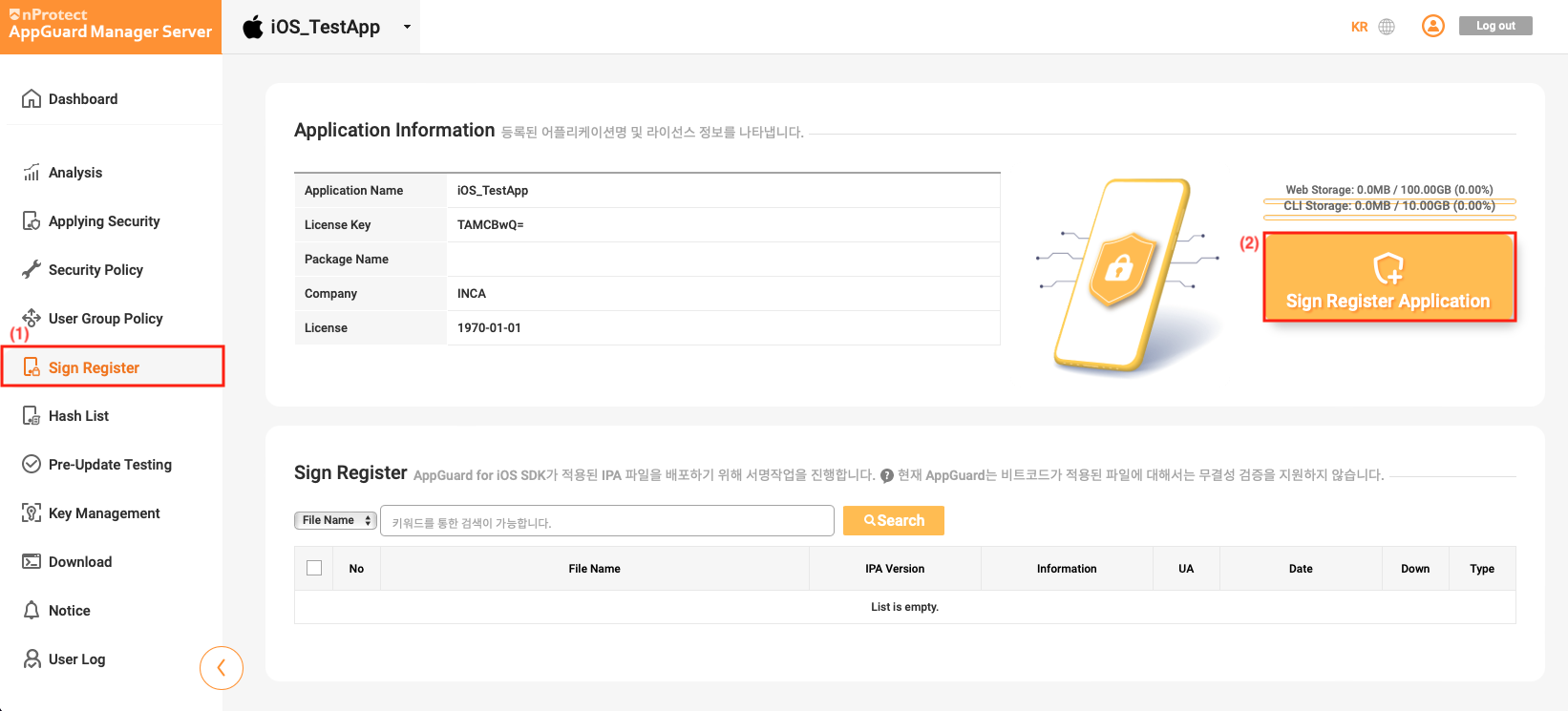
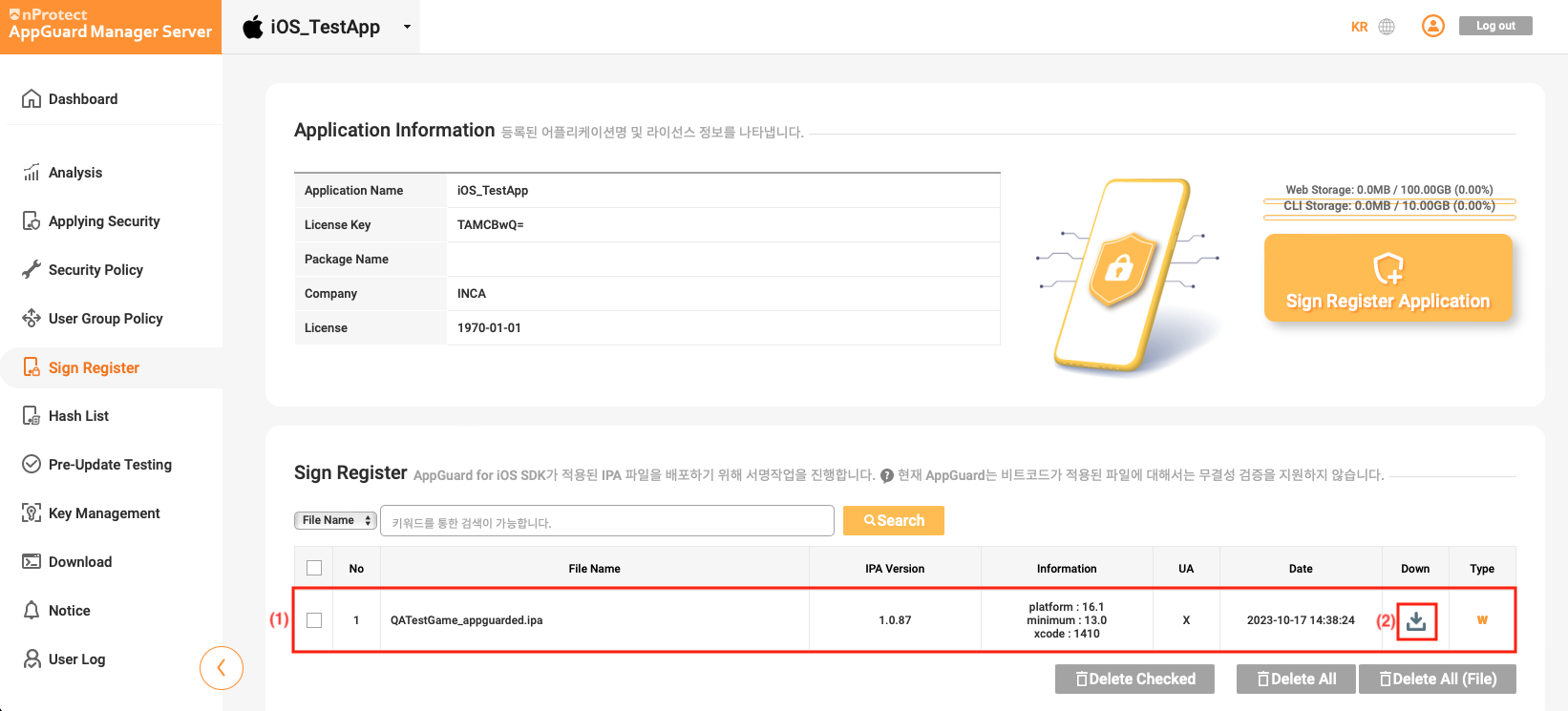
AppGuard Manager에서 [Sign Register] 를 선택한 후, [Sign Register Application] 버튼을 클릭합니다.
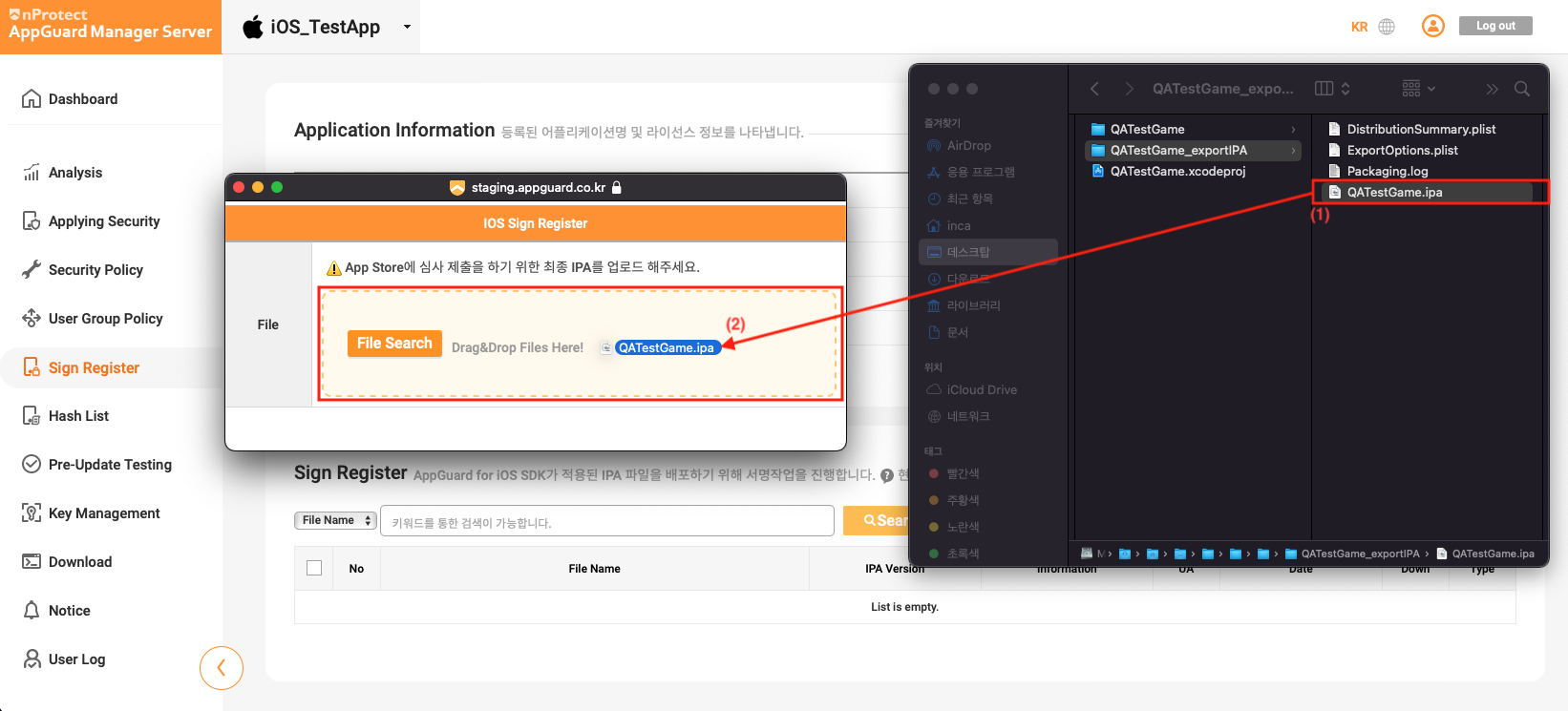
AppGuard Manager에 등록할 IPA 파일을 선택하여 [IOS Sign Register] 창에 Drag & Drop합니다.
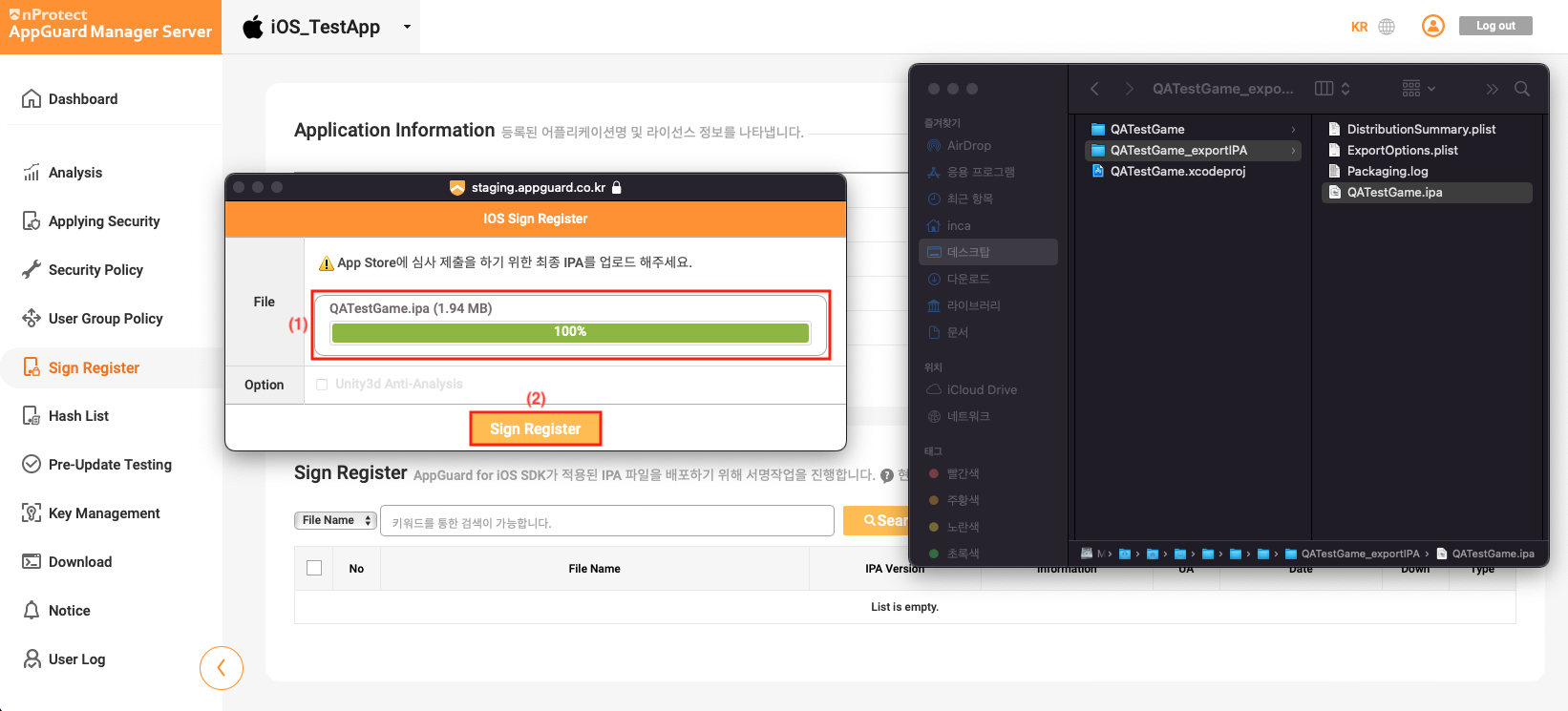
IPA 파일 업로드가 완료되면 [Sign Register] 버튼을 클릭합니다.
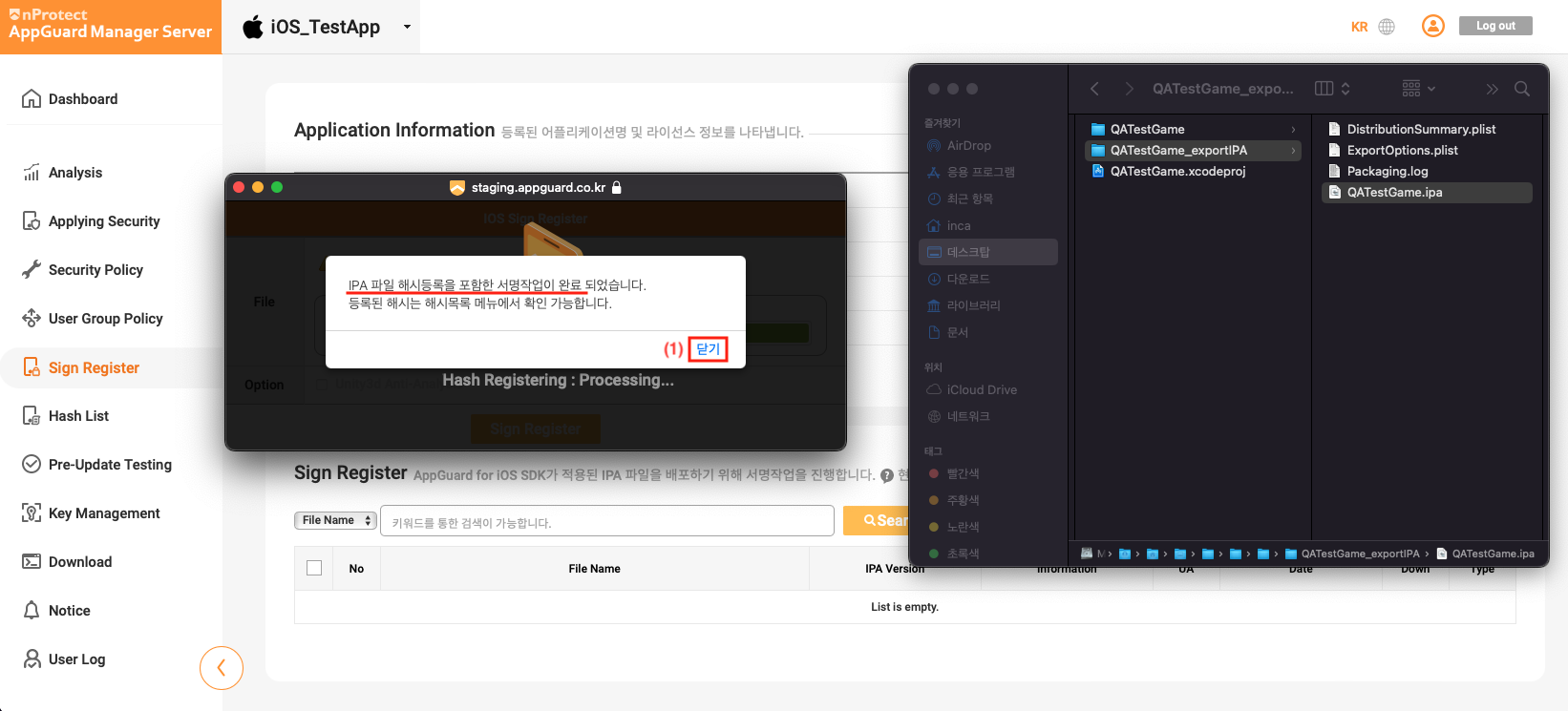
서명 작업이 완료된 후, 창에서 닫기 버튼을 클릭합니다.
등록 작업이 완료되면 아래와 같이 등록된 내용을 확인할 수 있으며, Down 버튼을 클릭하여 서명된 IPA를 다운로드합니다.
IPA 코드 서명 및 배포
AppGuard Sign이 적용된 IPA는 고객사의 배포용 인증서를 사용하여 코드 서명을 해야 합니다. 당사는 고객사의 인증서로 쉽게 코드 서명을 할 수 있도록 iparesign.sh 스크립트를 제공합니다.
-
코드 서명을 수행할 폴더를 생성하고, 서명된 IPA 파일과
iparesign.sh파일을 복사합니다.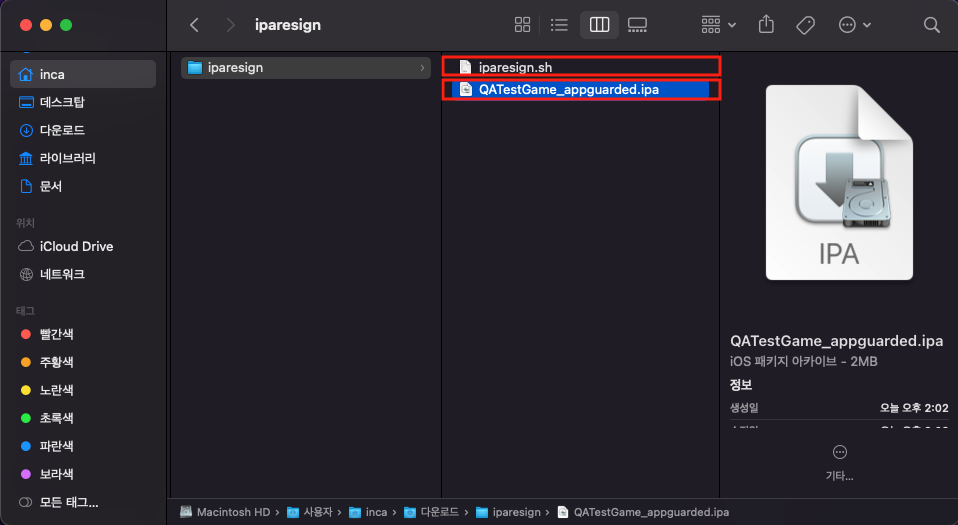
-
터미널을 실행하여, 코드 서명을 수행할 폴더로 이동합니다. 아래 명령어를 입력하여 코드 서명을 진행합니다.
$ cd [iparesign.sh 위치 경로]
$ ./iparesign.sh --ipa [/path/to/your_app_appguarded.ipa] -
코드 서명 진행 시 단계별 로그가 표시됩니다. 아래 로그와 같이 정상적으로 수행되었는지 확인합니다.
1. Check if an ipa file exists
[success] "QATestGame_appguarded.ipa"

2. unzip ipa package
[success] "QATestGame_appguarded.ipa"

. . .

10. codesign the app
/Users/inca/Downloads/iparesign/resigncompleted/Payload/xCode_1402_TestApp.app: replacing existing signature
[success] codesign the app

11. zip the package
[success] "/Users/inca/Downloads/iparesign/resigncompleted/QATestGame_appguarded_resigned.ipa"
(this ipa file has to upload at appstoreconnect.apple.com)
============= resign completed =============
inca@c2211-001Macmini iparesign % -
iparesign.sh가 정상적으로 수행되면, 코드 서명이 적용된resigncompleted/your_app_appguarded_resigned.ipa파일이 생성됩니다. 이 파일을 [Transporter]를 사용하여 App Store에 제출할 수 있습니다.
iparesign.sh 스크립트 상세 설명
iparesign.sh는 고객사의 인증서를 사용하여 IPA 파일에 코드 서명을 쉽게 적용할 수 있도록 제공되는 Shell Script입니다.
iparesign.sh --ipa path [--entitlements path] [--profile path] [--identity "Your Signing Identity"] [--out path]
| 옵션 | 설명 |
|---|---|
--ipa | 코드 서명할 IPA 파일의 경로를 지정합니다. |
--entitlements | entitlements 파일의 경로를 지정합니다. |
--profile | 코드 서명에 사용할 provisioning profile의 경로를 지정합니다. |
--identity | 코드 서명에 사용할 Signing Identity를 지정합니다. |
--out | 서명이 완료된 IPA 파일의 출력 경로를 지정합니다. |
iparesign.sh 를 사용하여 코드 서명을 하려면, 사용 중인 PC에 배포용 인증서가 설치되어 있어야 합니다.